InformIT has just published an interview with me where they asked me a bunch of questions related to C# 4.0 How-To. We got into the multicore future, Internet versus books, why C# programmers need to know about UAC, and a lot more. Check it out!
Category Archives: Software Development
C# 4.0 How-To Available Now!
Well, it’s finally out! Amazon no longer lists the book as available for pre-sale, and it should be shipping to purchasers today or tomorrow. If you’re a B&N shopper, you can also order it there, or grab it in stores within a few days.
From the product description:
Real Solutions for C# 4.0 Programmers
Need fast, robust, efficient code solutions for Microsoft C# 4.0? This book delivers exactly what you’re looking for. You’ll find more than 200 solutions, best-practice techniques, and tested code samples for everything from classes to exceptions, networking to XML, LINQ to Silverlight. Completely up-to-date, this book fully reflects major language enhancements introduced with the new C# 4.0 and .NET 4.0. When time is of the essence, turn here first: Get answers you can trust and code you can use, right now!
Beginning with the language essentials and moving on to solving common problems using the .NET Framework, C# 4.0 How-To addresses a wide range of general programming problems and algorithms. Along the way is clear, concise coverage of a broad spectrum of C# techniques that will help developers of all levels become more proficient with C# and the most popular .NET tools.
Fast, Reliable, and Easy to Use!
- Write more elegant, efficient, and reusable code
- Take advantage of real-world tips and best-practices advice
- Create more effective classes, interfaces, and types
- Master powerful data handling techniques using collections, serialization, databases, and XML
- Implement more effective user interfaces with both WPF and WinForms
- Construct Web-based and media-rich applications with ASP.NET and Silverlight
- Make the most of delegates, events, and anonymous methods
- Leverage advanced C# features ranging from reflection to asynchronous programming
- Harness the power of regular expressions
- Interact effectively with Windows and underlying hardware
- Master the best reusable patterns for designing complex programs
I’ll be doing a book giveaway at some point as well, once I get my own shipment. Stay tuned!
Get it from Amazon
Get it from Barnes and Noble
How to learn WPF (or anything else)
I’ve recently been learning WPF. This is a huge topic that is uncontainable by any single book, tutorial, or web-site. The complexity and breadth of this framework is nearly oppressive, but the results are incredible. Or rather, I should say, potentially incredible.
Like this? Please check out my latest book, Writing High-Performance .NET Code.
From everything I’ve read, people who have suffered through the WPF learning curve have this to say, more or less:
yeah, it was really tough going for a few months. But now I can create awesome apps in a fraction of the time it would take with older technologies.
So with that in mind, I really do want to learn WPF. I have a number of C# references, weighty tomes that bend my shelves, but the main book I use is Programming WPF
- Start reading the book, do the code, type stuff in, copy it, tweak it. Do this for as long as you can.
- Once step 1 becomes boring, STOP. It is not productive to force yourself through the whole thing like this.
- Find a sample project in your target technology. I used Family.Show. There are plenty out there.
- Think of a project YOU find interesting that would be good in [WPF|other]. Start doing this. Even if you don’t know where to start at all.
- While getting started, every step will be a challenge. Figure it out step-by-step, going back to the book and online resources.
You might be tempted to skip steps 1-2. I think this is a bad idea. You need at least some foundational understanding. Only when you can’t take it any more and you’re in danger of quitting, move on.
This has worked well for me in learning WPF. I decided to implement a game (if it ever gets into a polished state, I’ll share it).
Don’t underestimate the challenges in step 4, though. I had to think about how to even start, going back to the book numerous times, reading large sections. I looked up articles online about patterns and WPF, user controls, and more. Many seemingly-small steps in just displaying windows took hours to figure out. Figuring out data binding (really figuring it out in the context of my app) took hours. The point of doing your own project isn’t because it’s easier than following the book—it’s because it’s fun and you have more motivation to learn.
NDepend: A short review
NDepend is a tool I’d heard about for years, but had yet to really dive into recently. Thanks to the good folks developing it, I was able to try out a copy and have been analyzing my own projects with it.
Here’s a brief run-down of my initial experience with it.
Installation
There is no installation file—everything is packaged into a zip. After running, I was greeted by a project selection screen, in which I created a new project and added some assemblies. 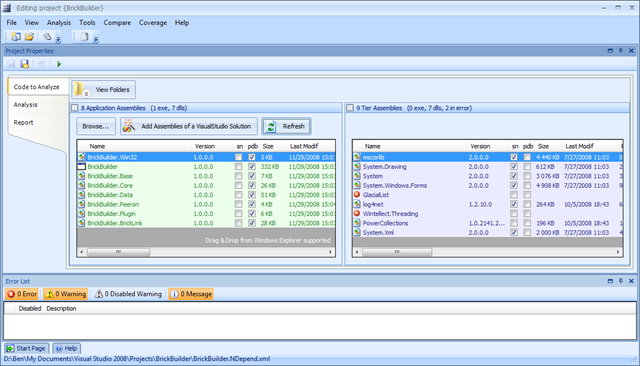
Analysis
Once you have all the assemblies you want to analyze selected, you can run the analysis, which generates both an HTML report with graphics, and an interactive report that you can use to drill down into almost any detail of your code. Indeed, it’s almost overwhelming the amount of detail present in this tool.
One graph you see almost immediately is Abstractness Vs. Instability.
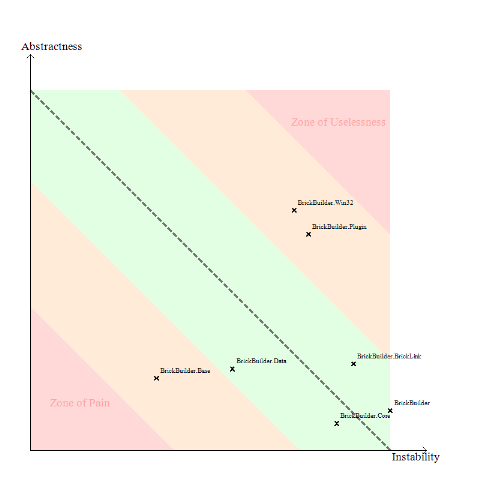
This is a good high-level overview of your entire project at the assembly level. Basically, what this means is that assemblies that are too abstract and unstable are potentially useless and should be culled, while assemblies that are concrete and stable can be hard to maintain. Instability is defined in the help docs in terms of coupling (internal and external), while abstractness is the ratio of abstract types to total types in an assembly.
This is followed by the dependency graph:
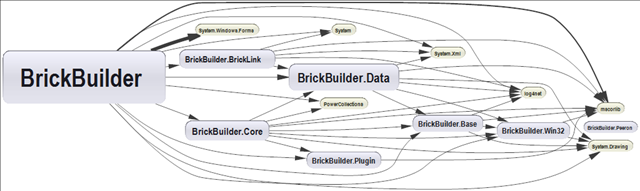
After these graphics come lots of reports that dig into your code for all sorts of conditions.
For example, the first one in my report was “Quick summary of methods to refactor".” That seems pretty vague, until you learn how they determine this. All the reports in NDepend are built off of a SQL-like query language called CQL (Code Query Language). The syntax for this is extremely easy. The query and result for this report are:
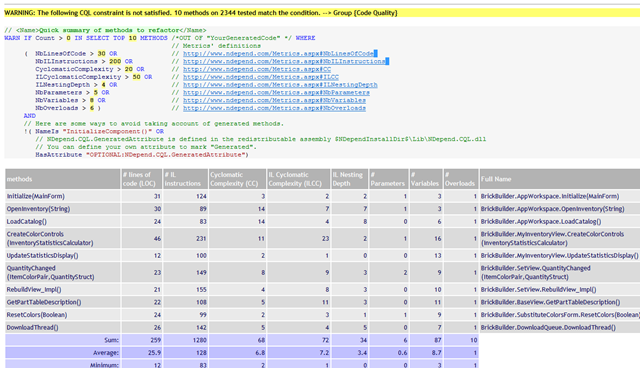
With very little work on my part, I instantly have a checklist of items I need to look at to improve code quality and maintainability.
There are tons of other reports: methods that are too complex, methods that are poorly commented, have too many parameters, to many local variables, or classes with too many methods, etc. And of course, you can create your own (which I demonstrate below).
Interactive Visualization
All of these reports are put into the HTML report. But as I said, you can use the interactive visualizer to drill down further into your code.
The first thing you’re likely to see is a group of boxes looking like this:
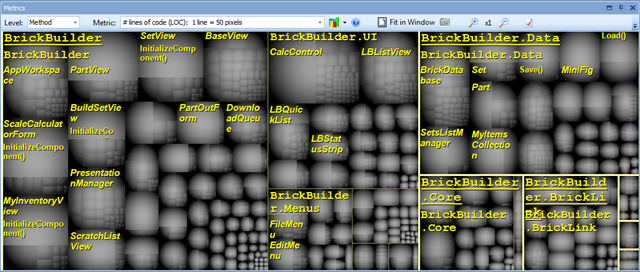
These boxes show the relative sizes of your code from the assembly level down to the methods. Holding the mouse over a box will bring up more information about the method. You can also change the metric you’re measuring by—say to cyclomatic complexity.
Another view, perhaps the most useful of all is the CQL Queries view. In this, you can see the results from all of hundreds of code queries, as well as create your own. For instance, I can see all the types with poor cohesion in my codebase:
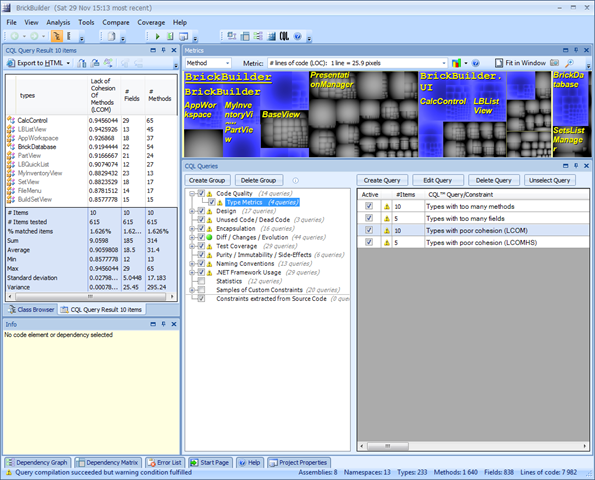
In this view, the CQL queries are selected in the bottom-right, and the results show up on the left. The metrics view highlights the affected methods.
Creating a query
Early in the development of my project, I named quite a few classes starting with a LB prefix. I’ve changed some of them, but I think there are still a few lying around and I want to change them as well. So I’ll create CQL query to return all the types that begin with “LB.”
1: // <Name>Types beginning with LB</Name>
2: WARN IF Count > 0 IN SELECT TYPES WHERE
3: NameLike "LB" AND
4: !IsGeneratedByCompiler AND
5: !IsInFrameworkAssembly
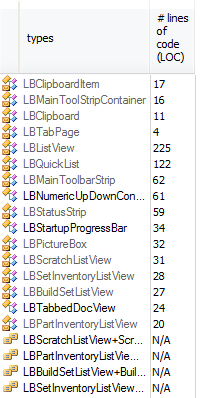 That’s it! You can see the results to the right. It’s ridiculously easy to create your own queries to examine nearly any aspect of your code. And that’s if the hundreds of included queries don’t do it for you. In many ways, the queries are similar to the analysis FxCop does, but I think CQL seems generally more powerful (while lacking some of the cool things FxCop has).
VS and Reflector Add-ins
NDepend has a couple of extras that enable integration of Visual Studio (2005 and 2008) and NDepend and Reflector. When you right-click on an item in VS, you will have some additional options available:
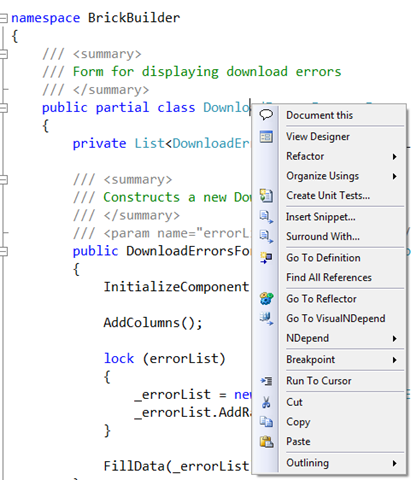
Clicking on the submenu gives you options to directly run queries in NDepend. Very cool stuff.
Summary and where to get more info
If you are at all interested in code metrics, and how good your code is behaving, how maintainable it is, you need this tool. It’s now going to be a standard part of my toolbox for evaluating the quality of my code and what parts need attention.
If you’re using NDepend for personal and non-commercial reasons, you can download it for free. It doesn’t have all the features, but it has more than enough. Professional use does require a license.
One of the things I was particularly impressed with was the amount of help content available. There are tons of tutorials for every part of the program.
I’m going to keep playing with this and I’m sure I’ll mention some more things as I discover them. For now, NDepend is very cool—it’s actually fun to play with, and it gives you good information for what to work on.
Links:
On the importance of ignoring your problems
I’ve been having a great time at Microsoft over the last couple of months, but the ramp to full productivity is very steep. Recently, I’ve been working on an important improvement to some monitoring software, which requires a fairly good understanding of part of the system. It can be a little overwhelming trying to design something to handle all the nuances involved. Add to that the time crunch, and things get a little interesting. Last night, I ran into a little wall where I was uncertain about how to proceed. This kind of situation is always a little precarious. I was worried because today and tomorrow I have full-day training and won’t be able to dedicate a lot of time to solving this problem.
Half way through the training, while discussing something tangentially related to my problems, I realized the technical solution to the specific issue I was facing.
Sometimes you just need to ignore the problem for a while, and come back to it from a different angle.
Software Creativity and Strange Loops
I’ve been thinking a lot lately about the kind of technology and scientific understanding that would need to go into a computer like the one on the Enterprise in Star Trek, and specifically its interaction with people. It’s a computer that can respond to questions in context—that is, you don’t have to restart in every question everything needed to answer. The computer has been monitoring the conversation and has thus built up a context that it can use to understand and intelligently respond.
A computer that records and correlates conversations real-time must have a phenomenal ability (compared to our current technology) to not just syntactically parse the content, but also construct semantic models of it. If a computer is going to respond intelligently to you, it has to understand you. This is far beyond our current technology, but we’re moving there. In 20 years who knows where this will be. In 100, we can’t even imagine it. 400 years is nearly beyond contemplation.
The philosophy of computer understanding, and human-computer interaction specifically is incredibly interesting. I was led to think a lot about this while reading Robert Glass’s Software Creativity 2.0
- Discipline versus Flexibility
- Formal Methods versus Heuristics
- Optimizing versus satisficing
- Quantitative versus qualitative reasoning
- Process versus product
- Intellectual versus clerical
- Theory versus practice
- Industry versus academe
- Fun versus getting serious
Too often, neither one of these sides is “right”—they are just part of the problem (or the solution). While the book was written from the perspective of software construction, I think you can twist the intention just a little and consider them as attributes of software itself, not just how to write it, but how software must function. Most of those titles can be broken up into a dichotomy of Thinking versus Doing.
Thinking: Flexibility, Heuristics, Satisficing, Qualitative, Process, Intellectual, Theory, Academe
Doing: Discipline, Formal Methods, Optimizing, Quantitative, Product, Clerical, Practice, Industry
Computers are wonderful at the doing, not so much at the thinking. Much of thinking is synthesizing information, recognizing patterns, and highlighting the important points so that we can understand it. As humans, we have to do this or we are overwhelmed and have no comprehension. A computer has no such requirement—all information is available to it, yet it has no capability to synthesize, apply experience and perhaps (seemingly) unrelated principles to the situation. In this respect, the computer’s advantage in quantity is far outweighed by its lack of understanding. It has all the context in the world, but no way to apply it.
A good benchmark for a reasonable AI on the level I’m dreaming about is a program that can synthesize a complex set of documents (be they text, audio, or video) and produce a comprehensible summary that is not just selected excerpts from each. This functionality implies an ability to understand and comprehend on many levels. To do this will mean a much deeper understanding of the problems facing us in computer science, as represented in the list above.
You can start to think of these attributes/actions as mutually beneficial and dependent, influencing one another, recursively, being distinct (at first), and then morphing into a spiral, both being inputs to the other. Quantitative reasoning leads to qualitative analysis which leads back to qualitative measures, etc.
It made me think of Douglas R. Hofstadter’s opus Godel, Escher, Bach: An Eternal Golden Braid
The Strange Loop phenomenon occurs whenever, by moving upwards (or downwards) through the levels of some hierarchical system, we unexpectedly find ourselves right back where we started.
In the book, he discusses how this pattern appears in many areas, most notably music, the works of Escher, and in philosophy, as well as consciousness.
My belief is that the explanations of “emergent” phenomena in our brains—for instance, ideas, hopes, images, analogies, and finally consciousness and free will—are based on a kind of Strange Loop, an interaction between levels in which the top level reaches back down towards the bottom level and influences it, while at the same time being itself determined by the bottom level. In other words, a self-reinforcing “resonance” between different levels… The self comes into being at the moment it has the power to reflect itself.
I can’t help but think that this idea of a strange loop, combined with Glass’s attributes of software creativity are what will lead to more intelligent computers.
No American resumes? – state of CS education
I had been planning on writing a blog entry on the apparently sad state of our CS industry these days, and the complete lack of qualified American resumes that come across my desk, when we actually got a decent one today.
Still, there is much to be said about the poor quality of education. At some points, we’ve gone through dozens of candidates that had such weak skills that I’m surprised they graduated from a reputable institution.
Then I noticed on the Google blog today a new initiative to partner with CS programs around the country. I applaud this effort and all like it. Serious companies like Google, Microsoft, Yahoo, Amazon, Adobe, Apple, and everybody else who builds amazing software need to get involved and lay down the expectations.
Does anyone know if Microsoft has a similar comprehensive program? I know that they have MSDNAA, but that seems more like giving software in a marketing campaign than setting the agenda. I do see smaller efforts with robotics that are great, but a more general push is needed.
I consider myself lucky for having gone through a fantastic computer science education at BYU. I found it even much better than my graduate program.
The thought leaders need to start insisting on higher standards, and we need to shame schools that churn out useless bodies whose jobs will soon be outsourced.
I can see some pushback from academic circles because they won’t want big business telling them how to teach, but the reality is that when schools are doing such a poor job of preparing people, they need to change and listen to those who are going to be hiring.
We need to stop complaining and start changing the situation.
Top 10 Reasons Why I’m Excited to Work at Microsoft
My last post was well and good (definitely read the comments), but I think I should be serious about my new employer because I really am excited to work there. Here are some reasons why:
- The opportunity to work with people smarter than me. The chance to meet some of the people I admire in the software community.
- The projects and technology under development always inspire me. Almost every event I’ve gone to has had me come away wanting to look into some other cool technology and thinking of the ways it can change the world.
- A real career path as a software engineer.
- Chance to change projects whenever I want. During my interviews, many people were quite open with me: they get bored with a project eventually and want to switch after two years or so. Microsoft’s culture easily allows this.
- Compete with Google. Google needs some real competition. Just as Firefox lit a fire under the IE team, MS needs to light a fire under Google.
- The benefits are awesome. They truly treat you well.
- They are extremely open on telecommuting.
- How many companies can you work at where your stuff affects so many people? There aren’t that many…
- The challenge. I love challenges. I love learning new things, and working hard to solve problems. Challenges are how you grow.
- The area. Beautiful country. Cheaper than DC. The rain.
What will be more interesting is to compare this list with what I come up with in a year.
log4cxx + VS2005 + Windows SDK v6.0 = compile error
If you are following the instructions to build log4cxx 0.10 in Visual Studio 2005, and you have the Windows Platform SDK v6.0 installed, you may get errors compiling multicast.c in the apr project.
I found the solution, and it’s pretty easy. Open up multicast.c and edit the lines:
136: #if MCAST_JOIN_SOURCE_GROUP
148: #if MCAST_JOIN_SOURCE_GROUP
to be, instead:
136: #if defined(group_source_req)
148: #if defined(group_source_req)
e voilà! now it compiles.
Adapting to Changes
Change is a fact of life. Nowhere is this more obvious in a medium where the very thing we make is completely intangible and malleable: software development. There is almost nothing that is impossible in software–there are only limited resources.
This malleability has been one of the reasons for the enormous pace of change we’ve seen in computers in the last half century, but at the same time it’s been a stumbling block to true engineering practices.
Regardless of philosophy, change will happen in all software projects to some degree. There are two extremes of development that most organizations fall between:
- A single coder hacks together whatever the boss needs changed today. (Also fixes bugs from yesterday’s fixes.)
- NASA’s awesomely rigid development practices for the Space Shuttle software (see the Manager’s Handbook for Software Development on the Book list) resulting in extremely high-quality, virtually bug-free software (at a very high price).
For most of us, neither extreme is appropriate. Deciding the right balance of change control is a hard problem, but it’s not impossible. Still, some organizations manage to do so badly at it that it deserves to be studied and dissected.
The Census
As an example, consider the 2010 Census, a project that has been covered in the press and on tech blogs over the last few months. The following is from the second paragraph of the report on the GAO’s study of this massive program:
In October 2007, GAO reported that changes to requirements had been a contributing factor to both cost increases and schedule delays experienced by the FDCA [Field Data Collection Automation] program. Increases in the number of requirements led to the need for additional work and staffing. In addition, an initial underestimate of the contract costs caused both cost and schedule revisions. In response to the cost and schedule changes, the Bureau decided to delay certain system functionality, which increased the likelihood that the systems testing…would not be as comprehensive as planned.[…] Without effective management of these and other key risks, the FDCA program faced an increased probability that the system would not be delivered on schedule and within budget or perform as expected. Accordingly, GAO recommended that the FDCA project team strengthen its risk management activities, including risk identification and oversight.
The Bureau has recently made efforts to further define the requirements for the FDCA program, and it has estimated that the revised requirements will result in significant cost increases.
As with many government projects, there is enough failure to go around. The key idea I want to focus on is a failure on the part of the government agency and on the part of the contractor implementing the technology to adequately plan for change.
Before that, though, I want to say that I have no knowledge of their specific management or technical practices, other than what is publicly reported. For all I know, all parties performed extremely well and still failed. (However, from friends and acquaintances in government and contractor positions around D.C., I think it’s fair to say that most organizations here are behind the curve in software best practices, to put it politely.)
With that (admittedly harsh) assumption, it’s apparent that the agency failed to adequately plan, think through requirements, and communicate effectively to the contracted company. On the developer’s side, it’s apparent they didn’t have effective mechanisms for handling changes.
Before a project is undertaken, a set of fundamental principles must be agreed upon:
- The client will change their minds. There is no such thing as “written in stone.”
- Making changes is hard or impossible.
These two principles are fundamentally in conflict. On the one hand, the developer must know that changes are going to occur: sometimes large changes. They can plan for that from the code level up to their organization and processes.
On the other hand, the client, must realize that they can’t just suggest a change at the end of the project and expect it to be thrown in and work correctly.
The tension between these two principles implies certain practices and expectations on all parties, which in an ideal world would lead to a successful outcome more often.
Developer Responsibilities
The developer, knowing that the client does not understand the full set of requirements up front, designs their system in a way that can easily handle change. This means modularity, this means testability. From details as small as designing methods to operate on Streams instead of filenames, to as large as easily reusable components.
The first step is a change in mind set: an acceptance that change will occur, and that it’s ok. When I first started development, frequent changes really frustrated me. Sometimes they still do, but I’m getting better (I hope). Once the mind is malleable, practices can be implemented to handle it effectively.
A few coding practices that encourage changes:
- Test-driven development (or at least full unit testing). In this day and age, with how easy it is to accomplish this, is there a good reason not to do it? I’m not convinced by many arguments against unit testing. A full suite of unit tests gives you confidence in your code, and the ability to safely refactor even large portions of your program. Full TDD I could go either way.
- Constant refactoring to fit the best design possible (within reason. Obviously, there is no “best” design). Software, like everything else in the universe, obeys the law of entropy. Without constant maintenance, it will degrade. Designs degrade as you add on to them. Classes degrade as you stuff them full of things. Don’t stand for it–take the time to make things neat. Get some good books on refactoring if you don’t know how to start.
- Highly Modular. Apply all your OO-design skills here. It matters. Cohesion and coupling really do matter.
- Small, frequent iterations. Most software systems these days are too big and too complex to understand at once. Iterative development is the key to success.
- Strong source-control practices. Does this even need to be discussed? If your organization doesn’t have good source control, you’re doing software wrong.
Other practices on the developer’s part read like a list of Extreme programming fundamentals:
- Communication – The key to any relationship, whether personal or corporate, is communication. The right amount should be discovered and adhered to. It should probably be slightly more than you’re comfortable with (since many developers would rather not talk to anyone ;).
- Simplicity – I believe that the single hardest thing to do in developing software is to manage complexity. It’s requires more brainpower and creativity than all other activities. Coding is easy. Coding so that it is easy to understand a year from now is difficult. If the design is needlessly complex up front, then change is that much harder to implement. Always remember that software complexity increases exponentially.
- Courage – Stand up for correct principles. Don’t allow politics to interfere with what needs to be done. Don’t be afraid to change the design if it needs to happen. Change coding practices as needed. Never be afraid of the truth–just deal with it.
- Respect – Both sides need to remember that the other is expert in their domain. Humility is key.
- Responsibility – this is something I fear is lacking much in government. Everybody needs to take responsibility for their part. This implies accountability. This can be shared responsibility at some levels, or the-buck-stops-here responsibility at higher levels. If no one is responsible, nobody cares if it fails. Courage is a prerequisite to this.
This mind set needs to encompass not just pure software development, but also processes at the organizational level. This can take many forms, but a few ideas:
- Personal relationships between clients and developers
- Flexible team structure and members
- An easy way to submit and discuss change requests
- A culture that accepts changes
- A good understanding of the problem domain
Jeremy Miller (The Shade Tree Developer) talks a lot about processes and practices and it is a very good read.
Unfortunately, there exists an attitude at many companies that it’s better to milk the clients for as much money as possible rather than do the hard work of getting a good process.
Client Responsibilities
I think my introduction and the discussion about developer responsibilities may imply that because software is so ephemeral, it is therefore easy to change it. After all, it’s not a physical object that has to be broken down and rebuilt–what’s so hard? To anyone who has worked on non-trivial projects, this is laughable. Let’s clarify:
It is easy to program. It’s painfully, mind-bendingly, insanely difficult to design software. So difficult, in fact, that no one can do it well. The sooner everybody understand that, the sooner we can get started with real work. Good design is thought-work, iterated over and over, added to experience and analysis.
Some details are easy to change. Others are fundamental to the structure of the building. By way of metaphor, changing your mind about a house you’re building to suggest a stone facade instead of brick is relatively easy. Deciding you would like to have ten stories added onto your house changes the game significantly. Now you have to build a completely new foundation.
I believe the customer’s responsibility is to gain knowledge and insight into the development practice so they understand why things are difficult. Computers are so fundamental to our culture, we can no longer afford to have companies and agencies run by people who don’t understand them to some degree. The exact degree is debatable, but it’s certainly higher than where we’re at now. In my own situation, I think that when I started my boss did not realize how seemingly-trivial changes could be phenomenally difficult to implement, and therefore bug-prone–all because of design decisions made earlier. I now have him understanding that there is no such thing as a simple change. (Of course, I still occasionally underpromise and overdeliver–I have to maintain my miracle-worker image after all. 🙂
A client who wants software done and doesn’t want to end up paying an extra $3,000,000,000 for software should understand that critical requirements can’t be left until the product is being delivered. “We didn’t think of it before” is not a good excuse.
A client who understands this will realize how critical initial requirements are and ensure they’re communicated clearly. Most of all, they don’t wait around twirling their thumbs, only to reject the system when it’s done because it doesn’t meet their requirements. They will insist on periodic feedback and demos to make sure things are going the right way.
The responsibility for huge failures is on everybody’s shoulders. I believe that it can often be traced back to an unwillingness to face up to the truth, lack of responsibility, and misunderstanding the nature of the project.
Large projects aren’t doomed to fail
There is a fundamental truth, however, of all projects: there exists at least one change that is too large to do. Maybe the Census required that change–I don’t know. I do know that if both sides follow the best practices they can, the number of must-fail changes can be minimized.
That said, here’s why I refuse to believe the census project wasn’t sorely mismanaged from the outset by all sides: FedEx, UPS, Amazon, Wal-Mart, Microsoft, and dozens (hundreds?) of other companies have built enormous and complex systems for managing large databases and mobile platforms involving thousands of partners. It is ridiculous to me that they could not have built a system for our government quicker, cheaper, and less epic failure than the one they got. If the Census is fundamentally more complex than the problems they deal with, someone please let me know.
Change is part of everything now
The ability to adapt to change is critical, not just for software developers, but for everyone in our society. Technology, events, trends, and money all flow so quickly now that those who can adapt quickly will succeed.
It’s not just software companies that need to adopt sound development practices. There will always be companies that build out our infrastructure (Microsoft, Google, Cisco, etc.), but in the end every company will be a software development company. Disregarding good practices because “we’re not a software” does not work anymore. It’s not true. You are a software company. We all will be.
Idealism or…
If a lot of this seems idealistic, that’s ok. I wish the world were like Star Trek as much as the next geek, but I realize that there are a lot of motivation$ out there. The world is what it is, but if we aren’t trying to improve it by working towards a standard, then what’s the point? We can improve it. There is no excuse for such catastrophic wastes of time, money, and effort.