Thoughts on Process: How much is enough

I’ve been thinking a lot about process lately, specifically how much process is enough, and how to automate things I do regularly. First of all, I think I’m lucky to work in a place that does not have a burdensome process in order to get anything done.

At its core, process is necessary because we as humans make mistakes quite easily. A process is a set of well-known, written guidelines to follow when doing a task.

I say written, though quite a few processes are mental, because if a process isn’t formalized, it’s more “This-is-how-we-do-things” than a real process. Process has to be repeatable by not only yourself, but by others.

I’m not the kind of person who really seeks after process formalization. I avoid paperwork like the plague, but even I admit that at some point you need to formalize at least something. The real question is how much process is enough. The answer is: exactly as much as you need and no more. The problem is, that amount is very difficult to find. I almost always err on the side of not adding overhead to anything until I see a clear need.

Process should not be added unless there is a clear and quantifiable benefit to the project. And I think the people who carry about the process should be the ones to judge if there is a benefit. Of course, there are exceptions, but I think for standard software projects, less is definitely more.

As an example, suppose I need bug tracking software. I find one that I like, and install it and we use it — it’s perfect for our situation. Along comes somebody else and insists that we switch to the corporate policy, even though my group does nothing like the rest of the company. It’s also a larger, more complicated program, and my group loses control of it. (If this sounds like a real situation, it almost is).

When confronted with this hypothetical, you should be asking yourselves, but what do I benefit? What does my team benefit? What does the product benefit? I do NOT ask what does the company benefit–why does that matter? If it doesn’t help our product and makes our jobs slightly more difficult, then the detriment is worse than any supposed benefit to the company as a whole. I’m sure you could argue this example both ways (for example, if support is an issue, maybe the company is right), but the point is to avoid processes and standards for the sake of themselves.

Here’s the key: Another word for process should be simplification. Having a process should simplify life, even if the actual steps are complicated. It’s the fact they’re written down, or we have automated tools, or that’s it formalized into a printed sheet of paper on a binder at our desk that simplifies it–it takes away our ability to inject mistakes. Does this make us mindless drones? For this process, yes!, but the point is that we shouldn’t be thinking about this anyway! Our minds should be hard at work creating something NEW. The process exists to make sure things go exactly as they need to, for the express purpose of freeing our minds to work on more interesting things.

A good process that I recently had to formalize was our final release build of our flagship product. After too many false starts, we realized that there were too many people, too many resources from various sources, and it was impossible to coordinate it all in someone’s mind. We needed a simple process to be signed off on. So a written checklist was created. We won’t use this for every build–just those that go to the customer. It’s simple, it works, it lets us worry about things worth worrying about.

I’ll talk about automation in another post…

Technorati Tags: , , ,

More on Google interview

This a follow-up to my previous post about my interview process with Google. Once a post gets as long as that one did, I’m sure to forget to say some things. Rather than updating that post, I thought I had enough new to say to warrant a new post.

First is the picture I got of their development process. There are plenty of other places on the Internet about their development process, so I won’t go into detail about what they told me–it pretty much matches up with the available information. It really sounds like they try to match the amount of process required to the specific project at hand. Projects with a huge public impact have lots of process (Google’s front page, indexing, etc.), while those that are newer and much lower impact (stuff in the Labs section, and even graduates of the Labs) have a much more flexible, agile process, designed to get improvements out the door very quickly. I like that–no mandatory bureaucracy where it doesn’t make sense.

Aside from process, however, it seems that they are very intent on giving developers an environment designed to help them succeed. From what I understood, the company actively tries to remove stupid barriers to productivity (needless paperwork, poor IT, bad workstations) and give you whatever you need to do your job how you think best. Obviously, there are rules and standards, but it just sounded more flexible. It really sounded like an ideal development environment: Obstacles removed, needs granted. Now, how much of that is the official “show” they put on for all interviews, who knows, but Google is obviously doing something right.

Bottom-line is that Google is a company of engineers for engineers. They’re the ones in charge of what the company does. That is a very nice place to be if you love coding.

Also, I should mention that the Google Boston office is MUCH smaller than their Mountain View headquarters. The way things are done, while it will still be “Googly”, will most likely have a different feel and pace than at headquarters. I had read many reports on the web about how people worked late hours, on weekends, and basically sacrificed their lives for the company. I did NOT get that impression in Boston. They were definitely smart and very hard working, but it sounded more like the company was flexible and if you got your work done, who cares? (That’s the way things ought to be done for sufficiently self-motivated employees). I did ask about inordinate over-time (mistake on my part?) and work-life balance and I came away with a satisfactory impression. Whether this means Boston is special, or the accounts I read on the Internet were not representative, I don’t know. Probably a lot of the latter, for sure.

I also wanted to address my final link in my last post. I know it can be a little disappointing to read that kind of post and realize it’s not talking about you, because you’re interviewing for jobs. I wouldn’t take it too literally. Maybe my link text is a little black and white. I think the principle is definitely valid, though. The better you are, the more freedom you have to choose where you work and what you work on and the less chance your going to fall into a company’s hiring process. It’s really more about statistics from a company’s point of view of finding the best, not necessarily for individuals.

Hopefully, that’s all I have to say on the subject, but if you have questions, just leave them in the comments and I’ll try to answer them!

My interview experience with Google

(See also part 2 of this article).

A few months ago I received an e-mail from a recruiter at Google asking for an opportunity to talk to me about available development positions. Needless to say, I was pretty excited. I’m fairly happy in my current job, but–it’s GOOGLE. You don’t say no to an interview opportunity at Google.

Like this article? Check out my latest book, Writing High-Performance .NET Code.

I’m writing this account in order to contribute to the meager resources available on the Internet about the Google interview experience. I signed an NDA, so I’m not going to say what the specific questions were, but I think I can give a pretty good idea of my experience. I apologize right now for the length.

I traded a few e-mails with a recruiter in Mountain View. I had a phone conversation with him, wherein he asked me general questions about my skills, desired work locations (giving me a choice of Santa Monica, Mountain View, and Boston). I have no desire to live in California, so I chose Boston. I was then passed to another recruiter, who setup a phone interview with an engineer in Mountain View. There was a false start, when they couldn’t do the interview at the original time, so we postponed.

The phone interview went very quickly. He was very nice and asked about my specific talents, things I enjoy doing, and projects I’d worked on–especially those I listed on my resume. He asked about the ray tracer I wrote in college, since he had an interest in that. He also asked some general questions about the stuff I do for work. Then he got into the technical question. It was an interesting problem, and I asked follow-up questions, talked out loud, wrote things down in front of me (and told him what I was writing and why). I immediately thought of the naive solution–always a good place to start. He was interested in the asymptotic complexity. I knew there were better ways of doing it, so I started thinking of optimizations to the algorithm, trying to come up with ways of caching information, reusing previously-computed values, etc. He gave me some gentle prodding, and I think I understood immediately where he was going. I answered the question fairly well, I though.

And that was it–just a single question. I was surprised. The entire thing lasted less than 30 minutes. I was almost disappointed, and thought–“well, that’s that–I won’t hear back.” I really wasn’t expecting any follow-up.

The next week, I got an e-mail from my recruiter who said I had impressed and was going to get the opportunity for an in-person interview in Boston! They hooked me up to a travel coordinator, as well as the recruiter in Boston.

Very exciting. I had a convenient time to go, so I set that up, took time off from work and went up to Boston, staying in the Cambridge Marriott. Very nice hotel. 40″ flat screen TV in the room ( which I never turned on). All expenses paid for, of course. 🙂 I did have to pay for hotel and food up front, and save the receipts. (And yes, I promptly received a reimbursement check from them a few weeks after I sent them in.)

I arrived on Monday afternoon, figured out Logan International (a very confusing airport, I thought), and got myself to Cambridge, in the heart of MIT, an hour or so later. I checked in, then went walking. I found the building Google is in on the very next block from the hotel. They have a floor in a building that MIT leases to startups, tech incubators, and the like. There are plenty of news articles about the Google Boston office–just…you know, Google for them.

I walked past the ultimate geek bookstore–

Quantum Books. Discount tech books. COOL. I would definitely have to stop there later. Then I got some cheap, awful Chinese food at the food court

right under the hotel. Why? When I could go out on Google’s dime? I think I was just tired and wanted to get back to the hotel soon and start studying.

I ate dinner in the room, took pictures of the wonderful view of the Boston skyline.

Boston Skyline (Day)

Boston Skyline (night)

Studying

What did I study? I brought two books with me: Robert Sedgewick’s Algorithms in C++, and a C++ reference manual. I went over advanced C++ topics, STL, simple sorting and searching algorithms, properties of graphs, big-O, and anything else that popped into my head.

By far the most valuable thing I did was write out algorithms before-hand. I picked something and wrote it out by hand in a notebook. It was hard going at first, but I knew it was the best thing I could do to prepare. I did selection and insertion sort in both array and list form. I did string reversal, bit reversal, bit counting, and binary search. All by hand, without looking in a book at all. As well you might know those simple algorithms, it’s harder than it sounds.

I went to bed relatively early–9:30, and woke up the next morning at about 6. I went to breakfast in the hotel restaurant, got a rather large meal, and then headed to my room to study more. I wrote more algorithms and redid some I had done the previous night.

Oh, I also wrote down in my notebook (beginning on the plane ride up) questions for Google, as well as answers to questions they could ask me (standard interview fare–projects, favorite project, languages, strengths, passions, getting along with people).

My interview was scheduled for 10 am–I checked out at 9:30 and left with my bag (I had everything in a single bag I could carry–it was very heavy) and sat in a little square for a few minutes. At about 9:50, I went in, took the elevator, and was greeted with:

.

. (ready for it?)

.

The Google

Dr. Seuss land! Yes, that was my first thought. I think the door was green, the reception area was very colorful. The receptionist was very nice and asked me to sign in on a computer, which printed a name badge for me. They had some research papers by Google employees on a wall, so I grabbed a couple (their hard drive failure study, and map/reduce). After a few minutes, my Boston recruiter came out and greeted me, offered me a drink from their free fridge, and took me to a small conference room, furnished, it appears, from Ikea. It was simple, clean, and very nice. There was a white board. I would get to know that whiteboard very well.

My first interviewer came in and we got started. I talked about my projects for a bit, they answered my questions, and then we got to the problem. Each interviewer asked me to solve a single problem (could be some sub-problems involved), and I had to do it on paper or on the board. I wrote C/C++ code. They take note of what you write and ask you further questions, especially if your first solution isn’t optimal.

I tried to take extra care with my code and not let stupid mistakes creep through. I used good variable/function names, made sure my braces matched, and I ran through the algorithm on the board once I had written it.

The first interview was one of the toughest. I was more nervous. I think I made more mistakes–I didn’t see things as quickly as I did later.

I had three interviews before lunch. They then handed me off to someone else who would not be evaluating me, but would just be an escort for lunch. The Google cafeterias in Mountain View are legendary, but the Boston office is far too small to warrant such lavishness. Instead, they have a catered lunch every day. It was wonderful. They also have all the free drinks and candy you could want, available all the time. I spent much of the time asking my escort questions about Google, what he was working on (couldn’t tell me), the area, the office, the commute. We were also joined by the head of the office, who didn’t realize I was an interviewee, and we had a nice conversation as well.

Lunch was an hour, and then I was back in the conference room. I had two more interviews. Then the recruiter came back in at about 3:15 or so and debriefed me–asked me my impressions, how I felt. I reiterated what I had told him on the phone previously, and that morning before we started: that I was trying to take this as easy and nonchalantly as possible, to have fun, and learn, and let it be a good experience. I had a job that I enjoyed, and didn’t NEED this one, but I think I would do well there and enjoy it very much. They came to me, after all.

I think by the end of the day, I was really pulling that off well. Once I got over my nervousness in the first interview, I really did have fun and enjoy it.

General Notes

They didn’t ask me any stupid questions. None of this “what’s your biggest weakness?” garbage. Not even the recruiter asked me anything like that. Nothing silly at all. They also didn’t ask me easy technical questions. They got right into the problems and the code. I had to describe an algorithm for something and write code for it. It was serious, they were all nice–I met people with serious reputations online. I felt like they were respecting me as a fellow programmer–almost. I wasn’t one of them, but they really wanted to see if I could become one of them.

I did receive prompts to get through certain problems, but not overly so. I answered every question they asked. Some I answered better than others, but the ones I didn’t get right away, I had alternate solutions, and I understood where they were going as soon as they started talking about it.

Why I didn’t get the job

Well, companies these days won’t tell you why. I think they fear it opens them up to lawsuits. I think that’s silly. It prevents those of who really do want to learn and improve from knowing what we’re deficient in. Oh well. They told me that they thought I would do well at Google, but that it wasn’t a good fit at the time, and I should apply again in the future. (Of course, I didn’t apply in the first place.)

My suspicions, however, are that I lean too much towards Microsoft technologies. I do a lot of work in .Net. That’s where more and more of my experience is. I do consider myself very good in C++, but I’m doing more and more C# work. I’ve always been a Microsoft Windows developer.

I also am not really interested in web-centric technologies, and I told them so. I’m more interested in client apps on the desktop, and server apps.

Of course, it’s very possible I just didn’t answer the questions to their satisfaction–that I needed more prompting than I should have. Oh well.

It could also be that my GPA wasn’t what they wanted. I goofed off my freshman year of undergraduate work. I really hurt my grades. I came back, though, and got straight A’s for my last few years where I took the hard CS classes. I also got straight A’s in my Master’s program while I was working full time. I don’t think this was the issue, but it’s possible.

Lessons

  1. Having your own web-site is a no-brainer. Do it. Update and maintain it.
  2. Do personal projects. You must be passionate, you must love programming. You must be good at it. Not average. You must aspire to excellence and be working towards that.
  3. Know what you’re talking about it. Don’t show off–just display your knowledge as it applies to what they asked you.
  4. Use an interview with them as a learning opportunity and ensure you have a good experience regardless of the outcome.
  5. Don’t take the interview too seriously. Make sure that not everything rides on the outcome. You must be comfortable, confident. You must try for success in every possible way, but yet be completely prepared to fail–and have that be ok. This is a hard balance to achieve, but I think it can really make you have a healthy outlook and have a good time while still showing your best self.
  6. If you don’t get an offer, realize that even being selected for an on-site interview by Google puts you above the ranks of the average-good programmers. Google gets 1,500 resumes a day. You’re already in the < 1% percentile.
  7. Practice writing code by hand in a notebook. This helped more than I can express. Do stuff that’s hard that you don’t know how to do immediately. Time yourself. Make the problem more challenging. If you can’t stretch yourself, they will and you’ll probably break. They did not ask me to do any of the specific questions I had practiced–but the experience writing out and the THINKING is what helped.
  8. Be able to explain your background (90% technical / 10% personal) in a few words. At some point you’ll be asked.
  9. Have a lot of questions for people. You’re interviewing them too. Make sure they’re good questions. Asking about salary is not a good question before you’ve been made an offer.
  10. I let the interview build my own self-confidence. I have no doubt that I could walk into an interview anywhere else and it would be laughably easy.
  11. Don’t ignore obvious, simple solutions. Sometimes a table lookup is better than an O(n) algorithm.
  12. Bring a good, FUN book for the plane ride back. On the way, I focused on the interview, but on the way home I wanted to do anything but, so I had my current novel (Dickens’ Bleak House–very good book, by the way).

If you do all of those steps, it actually doesn’t really matter if you apply to Google or any other great/famous company–you’ll probably get the job you want for the pay you want anyway. Somebody, sooner or later, will come across you and give you the opportunity.

Great programmers will rarely, if ever, need to look for jobs.

I hope this long, rambling essay is helpful to some. I make no claim that my experience is typical or that I’m being completely objective. In other words, YMMV.

Read part 2 of this article

What I’m doing to become a better developer

There was a meme going around about 5 steps people will take to become a better developer. I’m not a famous enough blogger to get tagged, but I’ll share my 2 cents anyway. There’s nothing like publicizing something to make you committed: 

  • Read more source code from other projects (especially .Net projects)

Now that I’ve started my own large, non-trivial application, more problems quickly become apparent–how do you structure an application, handle communication? The overall infrastructure becomes vitally important. Unlike DocView in MFC, .Net does not have a standard MVC-style architecture to build on top of.

It makes no sense to iterate over and over to come up with patterns that others have already solved well.

Projects I want to look at: Paint.Net, RSS Bandit, SharpDevelop, Rotor, Mono

  • Become a refactoring fiend

It takes a lot of work, but refactoring code whenever you can/should really pays dividends. I’m doing this in my current personal project, and even though it’s taken a few hours to do some of the major refactoring, it was worth it because implementing new features becomes nearly painless once the structure of the code allowed it. It’s a little harder to do at work, but I have done a little. I want to take this to the next level by always taking the time to restructure the existing code whenever the opportunity presents itself. Thankfully, I’ve spent a lot of time developing unit tests. This will help me use design patterns more thoughtfully, as well as become familiar with some of the more esoteric refactoring patterns in Martin Fowler’s Refactoring.

There are too many good books to name, but those are two of the best ones. I go through books quickly. Some books are worth reading over and over until the concepts become part of you. Of course, for that to happen, you have to actually implement the ideas into your projects. I definitely learned things in Code Complete my first time through that I have made part of me–so much so, that I probably couldn’t tell you what they were. But I know I could do better.

  • Exercise

Huh? That’s not related to programming! au contraire! Self-improvement is a lot more than learning more about your field–it’s training your body and mind to be in better shape. If I feel better, I think better. Now that I have my iPod nano and all the podcasts I could want, I have no excuse not to exercise more than I do. I’ve been getting better, but I have a ways to improve. A healthy body directly correlates to a healthy mind.

  • Build more original Lego models

Another one that isn’t really about programming?! Not so fast. I’ve built Legos for a while, but rarely have designed and built my own models. That needs to change. I have 12,000 Legos–I need to be exercising creativity, design processes, and hard work to achieve some original results. And I want to have fun.

Some other things I want to do:

These are other things I’m interested in trying out this year, but don’t have specific goals in mind yet:

  • Look into WPF — maybe good for UI for my BrickBuilder project?
  • learn more about COM. This has been slowly fading on the priority list. Is there a good reason to learn about COM these days, other than legacy support?
  • Continuous integration — I want to know more about it, but not sure how it would fit into our scenario at work. Once we get our staging server up, it might be a better fit.

Mouse tilt wheel horizontal scrolling in C#

In my current project, I’m using a custom ListView-like control to give my WinForms app a very rich interactive experience. This control does not implement mouse wheel scrolling like the Microsoft ListView implementation does so it was up to me to add it. You can use the knowledge in this article to implement full scrolling support in your own custom controls.

The custom component was derived from Control, which does provide the virtual function OnMouseWheel to handle vertical scrolling. The component also exposes the two scrollbars to manipulate.

First, take a look at Best Practices for Supporting Microsoft Mouse and Keyboard Devices, a good place to start learning about advanced mouse handling in Windows. Note that all of this requires IntelliPoint software to be installed.

Getting Started

Here’s some example code to get started with:

public class MyListView : GlacialComponents.Controls.GlacialList 
    { 

    }

Vertical Scrolling

As long as we’re talking about horizontal scrolling, let’s go ahead and discuss vertical scrolling with the mouse wheel. Add this override to the class:

protected override void OnMouseWheel(MouseEventArgs e)
        {
            base.OnMouseWheel(e);
           
        }

It’s overriding from the Control class, not GlacialList. Assuming you’ve read the MS documentation referenced about, you’ll know that the scroll message includes the number of ticks, which is usually a multiple of 120. We need to accumulate this number and then scroll our view a corresponding amount.

First, some class variables:

        private const int WHEEL_DELTA = 120; 
        private int _wheelPos = 0; 
        private int _wheelHPos = 0;

The _wheelHPos variable will be used later for horizontal scrolling. Then we modify our function to read like this:

protected override void OnMouseWheel(MouseEventArgs e)
        {
            base.OnMouseWheel(e);

            _wheelPos += e.Delta;

            while (_wheelPos >= WHEEL_DELTA)
            {
                ScrollLine(-1);
                _wheelPos -= WHEEL_DELTA;
            }

            while (_wheelPos <= -120)
            {
                ScrollLine(1);
                _wheelPos += WHEEL_DELTA;
            }
            Refresh();
           
        }

After we accumulate the value, we scroll one line per WHEEL_DELTA value. (This code could certainly be optimized, but I think this version is clear.) After the scrolling we tell the view to refresh itself. The Best Practices recommend handling partial-line scrolling. In my case, since I just need to manipulate the scrollbars by one unit at a time it’s not applicable, but I encourage you to understand their sample code.

The ScrollLine() function will be application-dependent. For this class, it just needs to modify the scrollbars that were provided.

private void ScrollLine(int numLines) 
        { 
            vPanelScrollBar.Value = Math.Max(vPanelScrollBar.Minimum,
                             Math.Min(vPanelScrollBar.Maximum, 
                vPanelScrollBar.Value + numLines)); 
        }

Horizontal Scrolling

That was fairly easy. Horizontal scrolling with the tilt-wheel is only a little more complex. This is because it’s not natively supported by the .Net Framework, and to a certain extent it’s not really supported on Windows XP. Full native support of the tilt wheel starts in Windows Vista.

Fortunately the IntelliPoint drivers fake it for us by sending our listview window a WM_MOUSEHWHEEL message anyway. Since .Net 2.0 doesn’t know what to do with this message (not sure about .Net 3.0), we need to take control of the message-handling and manually handle this message. The WndProc function is the function that handles all of this and it is virtual just for this purpose.

protected override void WndProc(ref Message m) 
        { 
            base.WndProc(ref m); 
            if (m.HWnd != this.Handle) 
            { 
                return; 
            } 
            switch (m.Msg) 
            { 
                case Win32Messages.WM_MOUSEHWHEEL: 
                    FireMouseHWheel(m.WParam, m.LParam); 
                    m.Result = (IntPtr)1; 
                    break; 
                default: 
                    break; 

            } 
        }

If you’ve done Win32 programming this will look very familiar, if a little out of place in .Net code. There are a few things going on here. First of all, you must call the base-class version of WndProc or your window will be very unexciting and quite broken. Take a look at WndProc for any control in Reflector to see all the work it’s doing.

Next, there is the Win32Messages class. This is an abstract class of my own creation that serves merely as a place to put definitions for Windows’ message definitions.

abstract class Win32Messages 
    { 
        public const int WM_MOUSEHWHEEL = 0x020E;//discovered via Spy++ 
    }

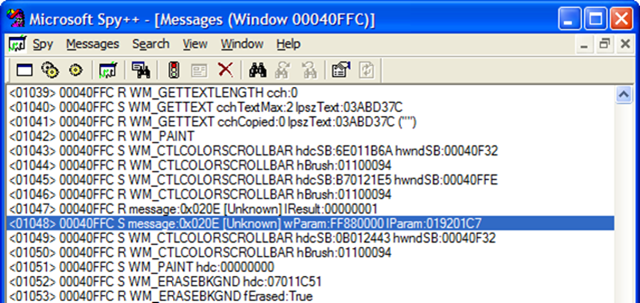
So how did I know it was supposed to be have the value of 0x020E? Well, I could look in the Vista SDK where it’s defined, or I could read the Best Practices document referenced before. I didn’t find that page until after I had finished this implementation and I just used Spy++ to discover the messages coming to my window when I hit the tilt button:

SpyHorizTiltWheelMsg

Before we get to the FireMouseHWheel function, notice that m.Result is set to 1. This is because the docs state that the message handling must return 1 to indicate to Intellitype that we’ve handled the message.

There are two versions of this function. One takes the raw WPARAM and LPARAM values from the message and the other takes more meaningful values. As you can guess, one should probably call the other.

        public event EventHandler<MouseEventArgs> MouseHWheel; 
        protected void FireMouseHWheel(IntPtr wParam, IntPtr lParam) 
        { 
            Int32 tilt = (Int16)Utils.HIWORD(wParam); 
            Int32 keys = Utils.LOWORD(wParam); 
            Int32 x = Utils.LOWORD(lParam); 
            Int32 y = Utils.HIWORD(lParam); 

            FireMouseHWheel(MouseButtons.None, 0, x, y, tilt); 
        } 

        protected void FireMouseHWheel(MouseButtons buttons,
            int clicks, int x, int y, int delta) 
        { 
            MouseEventArgs args = new MouseEventArgs(buttons,
                                         clicks, x, y, delta); 
            OnMouseHWheel(args); 
            //let everybody else have a crack at it 
            if (MouseHWheel != null) 
            { 
                MouseHWheel(this, args); 
            } 
        }

I declare an event that takes the same type of arguments as the vertical MouseWheel handler above. The first FireMouseHWheel function converts wParam and lParam into the real values according to the specification given. I ignore the keys value and pass the others to the second function which calls my handler and also raises the event to give class consumers the opportunity to be notified as well.

To “crack” the values, I have some simple utility functions:

abstract class Utils 
    { 
        internal static Int32 HIWORD(IntPtr ptr) 
        { 
            Int32 val32 = ptr.ToInt32(); 
            return ((val32 >> 16) & 0xFFFF); 
        } 

        internal static Int32 LOWORD(IntPtr ptr) 
        { 
            Int32 val32 = ptr.ToInt32(); 
            return (val32 & 0xFFFF); 
        } 

    }

The OnMouseHWheel is very similar to its cousin for vertical scrolling:

protected virtual void OnMouseHWheel(MouseEventArgs e) 
        { 
            _wheelHPos += e.Delta; 
            const int pixelsToMove = 3; 
            while (_wheelHPos >= WHEEL_DELTA) 
            { 
                ScrollHorizontal(pixelsToMove); 
                _wheelHPos -= WHEEL_DELTA; 
            } 

            while (_wheelHPos <= -120) 
            { 
                ScrollHorizontal(-pixelsToMove); 
                _wheelHPos += WHEEL_DELTA; 
            } 
            Refresh(); 
        }

The pixelsToMove variable is noteworthy because it’s hard-coded to 3. It is kind of arbitrary because it really depends on the application and how the scrollbars are used. I’ve set it to 3 as a good value for my application.

The ScrollHorizontal function is similar to ScrollVertical and is also application-specific:

private void ScrollHorizontal(int amount) 
        { 
            hPanelScrollBar.Value = Math.Max(hPanelScrollBar.Minimum,
                   Math.Min(hPanelScrollBar.Maximum - hPanelScrollBar.mWidth, 
                hPanelScrollBar.Value + amount)); 
        }
 

Potential Issues

The Best Practices document states:

When an application receives a WM_MOUSEHWHEEL message, it is responsible for retrieving the characters-to-scroll user setting (SPI_GETWHEELSCROLLCHARS) by using the SystemParametersInfo API. This setting will not be available on Windows 2000 and Windows XP, so use the value of 1. IntelliType Pro and IntelliPoint will maintain a substitute value for the characters-to-scroll user setting and send the correct number of WM_MOUSEHWHEEL messages.

(Emphasis mine) Notice that last phrase. IntelliPoint can potentially send multiple WM_MOUSEHWHEEL messages for a single tilting action. This means that my strategy of refreshing on every message might not be entirely wise. It really depends on how long it takes to refresh the control. If it can be done smoothly and instantly, then this might not matter. Otherwise, you might need to come up with a way of accumulating ticks over multiple messages and scrolling all at once, perhaps after a timer expires. In my case, I think I’ll ignore this issue for now. I don’t really care if the control refreshes too often.

Have fun adding horizontal scrolling to your app!

There’s a reason my blog has been sparse…

I’ve been working a lot on a software project. It’s the first thing I’ve done in a long time that I’ve been passionate about. Basically, it’s a LEGO® inventory management system. I know that some existing stuff already exists out there, but mine is going to have a little different focus. I don’t want to leak too many of the features yet, but in a few words, it’s going to be easier to use, faster to update inventory, and have some cool and useful features.

UnitTest++

I’ve got a great process using NUnit in all my .Net projects. However, at work we have a large MFC/C++ application that has NO automated testing. I’ve been planing on getting unit testing into it for quite a while, but finally decided this is the week to do it.

It turns out that C++ unit testing is nowhere near as standardized or easy as .Net or Java. Partly, it’s the lack of reflection/introspection, but I think it’s also because the language itself just doesn’t lend itself to it.

There are a few very good resources for C++ unit testing. I first came across Noel Llopis’ Exploring the C++ Unit Testing Framework Jungle. I was just about set on using CxxTest, just as he had decided, but realizing that the post was written at the end of 2004, I continued my research. Sure, something must have improved since then! I came across UnitTest++: The New choice for C++ Unit Testing. It turns out to be partially written by Noel Llopis, so I thought this must be good since he gave such good reviews of the earlier solutions. You can read more about it here.

UnitTest++ seems to be the best of all possible worlds. It’s extremely simple to add test cases. I won’t include examples here, because the previous links have plenty.

The only thing I wish I could find is an open source code coverage C++ tool. I couldn’t survive without NUnit/NCover in C#.