I’m using Simple Tags to do the tags on this site. I wanted to enable support for these tag links in Windows Live Writer (it beats having to log in and edit each post after publishing).
Quite easy:
- Click on Insert Tags
- In the Tag Provider combo, scroll to the bottom where it says (Customize Providers…) and select that. It brings up another dialog.
- Click Add…
- Here’s what I entered for my site:
HTML Template: <a href=”https://www.philosophicalgeek.com/tag/{tag-encoded}” title=”{tag}” rel=”tag”>{tag}</a>
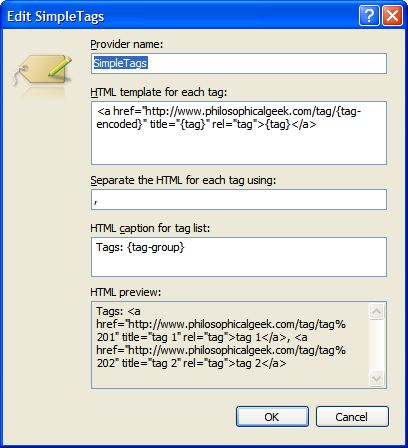
Now you can select Simple Tags as your tag provider.
but it’s print tags in the content of post , not to tag feilds!